

You do not need a Swagbucks sign up code to get the new member bonus. The current offer is 1,000 SB, worth $10, and it is added to your account as a SwagUp when you join. The catch is that it only pays out after you make a qualifying purchase.
Sign up bonus of $10.00 through this link. To receive it, you must spend at least $25 on a qualifying purchase through the Swagbucks shopping portal within 30 days of joining.
The apps actually paying right now, every Friday
One short email a week with the sign up bonuses worth grabbing and the apps that really pay out. Free, unsubscribe in one click.

1. Swagbucks
$10 Bonus With $25 PurchaseThe Swagbucks welcome offer is 1,000 SB, which converts to $10 in gift cards or PayPal cash. Creating an account does not pay it out by itself. You unlock it by placing one order of $25 or more at a store in the Swagbucks shopping portal during your first 30 days. There is no code to type in, because the offer is already waiting on your SwagUp page after you register. Swagbucks says the purchase typically credits within 32 days, with the bonus following a couple of days later.
Is There a Working Swagbucks Sign-Up Code?
Swagbucks still accepts sign up codes on its registration form, but I could not confirm a specific code that is valid today, so this page does not list one. Codes posted on coupon sites are often expired, and entering a dead one only returns an error.
The good news is that a code is not what triggers the bonus. Swagbucks describes the $10 welcome bonus as a SwagUp that sits on your SwagUp page. It is tied to your new account, and you unlock it with a purchase, not with a code. If you are signing up for other apps too, here is how ReferralWallet works and how its sign-up bonus packs get claimed.
Do not confuse a sign up code with a Swag Code. Swag Codes are short strings of letters and numbers that Swagbucks gives out to members for instant SB. They are a small extra and have nothing to do with the new member bonus.
How To Earn $10 New User Bonus from Swagbucks
The whole process takes a few minutes of your time and then a few weeks of waiting. Follow these steps in order.
- Open the sign up page. Go to Swagbucks and create a free account with your email address and a password.
- Confirm your email. Click the link in the confirmation message so the account is fully active.
- Find the welcome bonus. Open the SwagUp page in your account. The $10 bonus is listed there along with the date you need to shop by.
- Pick an eligible store. Open the Shop section, choose a store, and read that store’s page to check that the item you want is in a category that earns SB.
- Spend $25 or more in one order. Click through to the store from Swagbucks and complete the order. It has to be a single purchase of at least $25, made within 30 days of joining.
- Wait for it to credit. The order shows as pending first. Once the purchase credits, the 1,000 SB bonus is added a couple of days later.
If you have nothing to buy this month, skip the bonus. Spending $25 you had not planned in order to get $10 back is a loss, not a bonus. The best use is an order you were going to place anyway, such as household supplies or a gift.
What Counts as a Qualifying Purchase
According to the Swagbucks help center, the purchase has to meet all of these conditions:
- At least $25 spent on a single purchase.
- Bought from a store in the Swagbucks shopping portal, in a category that the store’s Swagbucks page lists as eligible.
- Not from MyGiftCardsPlus, Amazon, eBay or The Home Depot. Swagbucks excludes all four from the welcome bonus.
- Not a travel booking and not a flat-rate cash back offer.
- Not excluded by the store’s own terms on its Swagbucks page.
Swagbucks notes that stores can change their eligible categories, so check the store page on the day you shop. Beyond that list, Swagbucks does not publish a fixed set of stores that qualify.
How Long the Bonus Takes to Post
Plan on about five weeks, and sometimes longer. Swagbucks says a shopping order usually appears as pending in your Activity Ledger within 30 minutes to 7 business days. For the welcome bonus, it says the purchase typically credits within 32 days and the bonus is awarded a couple of days after that.
Its general shopping policy allows 32 to 75 days from the purchase date for SB to be awarded, so a slow store can push the bonus past the five week mark. This is not a same day bonus. If you want money sooner, look at these sign up bonus apps instead.
Why the Swagbucks Bonus Does Not Post
When the 1,000 SB never shows up, it is almost always one of these:
- The order was under $25. Two smaller orders do not combine. It has to be one purchase.
- The store or item was excluded. Amazon, eBay, The Home Depot, MyGiftCardsPlus, travel and flat-rate cash back offers do not count, and neither do categories the store has ruled out.
- You shopped after the 30 days ran out. The clock starts when you register, not when you first open the Shop section.
- The purchase was not tracked. Swagbucks recommends turning off ad blockers, because they can stop a store visit from being recorded.
- The points credited too late. A shopping SwagUp has two dates: the date you must shop by and the date the points must credit by. The second one is shown on your SwagUp ledger.
If your order is not showing as pending after 7 business days, find the store visit in your Activity Ledger and click the help icon next to it. That opens a support form for that specific purchase. Keep your order confirmation email, because Swagbucks can ask for a receipt.
How to Make the Best of Swagbucks
The welcome bonus is a one time $10. What you earn after that depends on which parts of the site you use. Every 100 SB is worth $1. For the full picture of what the site pays and who should skip it, read the Swagbucks review.
Referral Program (Best Method)
Referrals are how I earned most of my Swagbucks rewards. Swagbucks pays you 10% of what your referrals earn for as long as they stay active, with no cap. Sign up bonuses, Swag Codes and daily goal bonuses are left out of that 10%.
There is also a 300 SB bonus for both of you if the person you invite earns 300 SB before the first of the next month. Swagbucks credits it during the first week of the following month. You do not need a blog for this. Your referral link is under Refer and Earn in your account, and you can share it with friends or on forums that allow it.
Maximizing Daily Earnings
New members can start earning on day one without spending anything:
- Surveys. Swagbucks says most surveys pay 100 to 300 SB, which is $1 to $3 each. See how that compares with the other highest paying survey sites before you put hours into it.
- Shopping cash back. You earn SB on orders placed through the portal. This is the same habit that unlocks the welcome bonus, and it keeps paying afterward. It is one of the cash back apps I use most.
- Daily goal. Your account shows a daily goal meter. Hitting the first goal day after day builds a streak that pays a monthly bonus.
- Swag Codes. Free codes that add instant SB to your balance. They are small, but they take seconds to enter.
Surveys alone will not earn much per hour. If surveys are what you want, compare the full list of paid survey sites first.
Redeeming Swagbucks
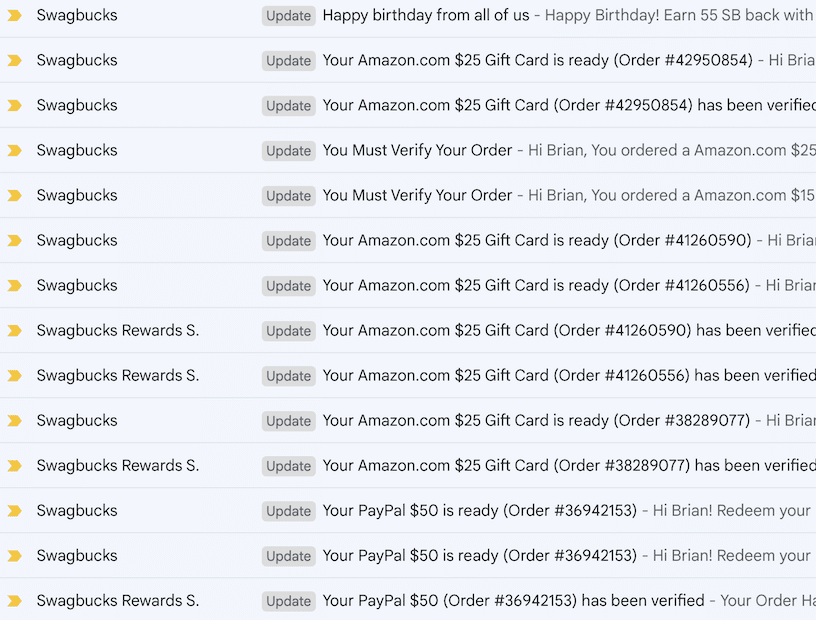
You trade SB for gift cards or PayPal cash in the rewards store. The 1,000 SB welcome bonus is enough for a $10 gift card by itself. I prefer Amazon gift cards when Swagbucks has them on sale for fewer SB, since that stretches the same balance further.
Other App Bonuses to Consider
If the $25 purchase rule puts you off, these two bonuses work differently. Neither one is a rewards site clone of Swagbucks, so read what each asks of you. For higher amounts, see the list of $25 sign up bonus offers.

2. InboxDollars
$5 Sign-Up BonusInboxDollars has the same parent company as Swagbucks, but its welcome offer is simpler. You get $5 for signing up and confirming your email. Everything is listed in dollars and cents, so there is no SB math. The trade off is a $30 minimum before you can withdraw, which means the bonus is a head start and not a payout.

3. Acorns
$20 BonusAcorns is an investing app, so its bonus is a different kind of offer from a rewards site. It links to your card, rounds each purchase up to the next dollar and invests the difference. New accounts can get a $20 bonus, and the sign up page spells out what you have to do to earn it. Plans start at $3 a month, so it only makes sense if you intend to keep investing after the bonus arrives.
How to Make the Most of Sign-Up Bonus Apps
The same few habits apply to Swagbucks and to every other bonus on this page:
- Read the requirement before you sign up. A bonus that needs a purchase, a deposit or a subscription is only worth it if you wanted that thing anyway.
- Write down the deadline. The Swagbucks window is 30 days. Put the last day in your calendar on the day you register.
- Keep proof. Save the order confirmation and a screenshot of the offer terms until the bonus posts.
- Work on one bonus at a time. Finishing one requirement beats starting five and missing every deadline.
To sum up: there is no code to hunt for. Join Swagbucks, place one planned order of $25 or more through the shopping portal inside 30 days, and give the 1,000 SB about five weeks to arrive.
Frequently Asked Questions
Swagbucks still accepts sign up codes when you register, but I could not confirm a specific code that is valid today, so none is listed here. You do not need one. The 1,000 SB welcome bonus is added to your SwagUp page when you create an account.
Create a free account, then spend at least $25 on a single qualifying purchase through the Swagbucks shopping portal within 30 days of joining. Once that purchase credits, Swagbucks adds 1,000 SB, which is worth $10 in gift cards or PayPal cash.
Swagbucks says the qualifying purchase typically credits within 32 days and the bonus is awarded a couple of days later. Its general shopping policy allows 32 to 75 days from the purchase date, so some stores take longer.
The usual reasons are an order under $25, a purchase from an excluded store such as Amazon, eBay, The Home Depot or MyGiftCardsPlus, a travel booking, shopping after the 30 day window, or an ad blocker that stopped the visit from tracking. If the order is not pending after 7 business days, use the help icon next to that store visit in your Activity Ledger.
No. A Swag Code is a short code that Swagbucks gives to existing members for instant SB. A sign up code is entered once at registration. Neither one is required for the 1,000 SB welcome bonus. The Swagbucks review covers the other ways to earn.
The apps actually paying right now, every Friday
One short email a week with the sign up bonuses worth grabbing and the apps that really pay out. Free, unsubscribe in one click.





Swagbucks only gave me $2 for sign-up bonus using the url presented on the pages at beermoney.com